X.509 Signatures in PDF: Embedded Certificate Proves Who Signed
April 19, 2026
Digital signing has now become standard in modern organizations. Contracts, purchase orders, minutes, HR documents and quotations are increasingly handled fully digitally. But one question remains crucial: how can you be sure who exactly signed, and how can you prove that later?
The answer lies in X.509‑based electronic signatures, which are integrated directly into the PDF document. When a document is signed with an X.509 certificate, it becomes a qualified electronic signature as defined in the European eIDAS regulation. Thanks to this qualified signature, you can verify at any time in Adobe Acrobat Reader who signed the document and whether the content has remained unchanged since signing.
With OKSign, you can have documents signed using itsme® eSign and Smart‑ID. These solutions place a X.509 certificate of the signer directly into the PDF document, making the signature automatically a qualified electronic signature under the eIDAS regulation.
What Is an X.509 Signature in a PDF?
X.509 is an international standard for digital certificates. Such a certificate contains, among other things:
- The identity of the signer (person or organization)
- The public key associated with the private key used to sign
- The certificate authority (CA) that issued the certificate
- The validity period and technical parameters
When someone signs a PDF with an X.509 certificate, a cryptographic signature is added to the document. This signature is mathematically linked to:
- the content of the PDF (integrity)
- the signer’s certificate (identity)
Importantly, the X.509 certificate is embedded in the PDF document itself. It always travels with the document, wherever it is sent. You do not need to provide separate certificate files: everything is contained in a single PDF file.
The Embedded Certificate: Always Verifiable, for Everyone
Because the X.509 certificate is integrated into the PDF, anyone who opens the document can verify the signature. No expensive software is required: the free Adobe Acrobat Reader is sufficient.
In a signed PDF, you can use Acrobat Reader to:
- Select the signature in the signatures panel
- View the signature details, including the status (valid, modified, expired…)
- Open the embedded certificate of the signer and verify the identity, issuer and validity
This means concretely:
- You see who signed (name, and often organization)
- You see which certificate authority issued the certificate
- You see whether the certificate is still valid and not revoked
- You see whether the document was modified after signing
Because the certificate is embedded in the PDF itself, this verification remains possible even years later, on another computer or by another party. The proof literally travels with the document.
Qualified Electronic Signature Under eIDAS
Within the European Union, the eIDAS regulation is the legal framework for electronic identification and trust services. eIDAS distinguishes three levels of electronic signatures:
- Simple electronic signature
- Advanced electronic signature
- Qualified electronic signature
A qualified electronic signature is the highest level and offers the strongest legal certainty. It is based on:
- A qualified certificate for electronic signatures
- Issued by a qualified trust service provider (QTSP)
- And applied using a qualified device (such as a secure smartcard, hardware token or qualified cloud signature)
The major advantage: under eIDAS, a qualified electronic signature has the same legal effect as a handwritten signature. In the EU, a qualified signature must in principle be accepted in the same way as a traditional paper signature.
When you sign a PDF document with a X.509‑based qualified electronic signature, you combine:
- Technical assurance: cryptography, integrity checks and an embedded certificate visible to all.
- Legal assurance: an eIDAS‑compliant qualified signature with the same value as a handwritten signature.
Why This Is So Powerful in Practice
For companies, governments and organizations, this approach provides several very concrete benefits:
- Transparent verification: anyone with the free Adobe Acrobat Reader can verify the signature and embedded certificate without additional tools.
- Reliable identification: the signer’s identity is linked to an X.509 certificate embedded in the document.
- Document integrity: any modification after signing is detected and invalidates the signature.
- Legal strength: a qualified electronic signature under eIDAS has the same legal status as a handwritten signature.
- Archiving and portability: the proof travels with the PDF file; even when forwarded, archived or shared, everything remains verifiable.
What Does the itsme® Signature Look Like in a PDF Document?
A qualified X.509 signature is added at the end of the document on a separate page (see screenshot).
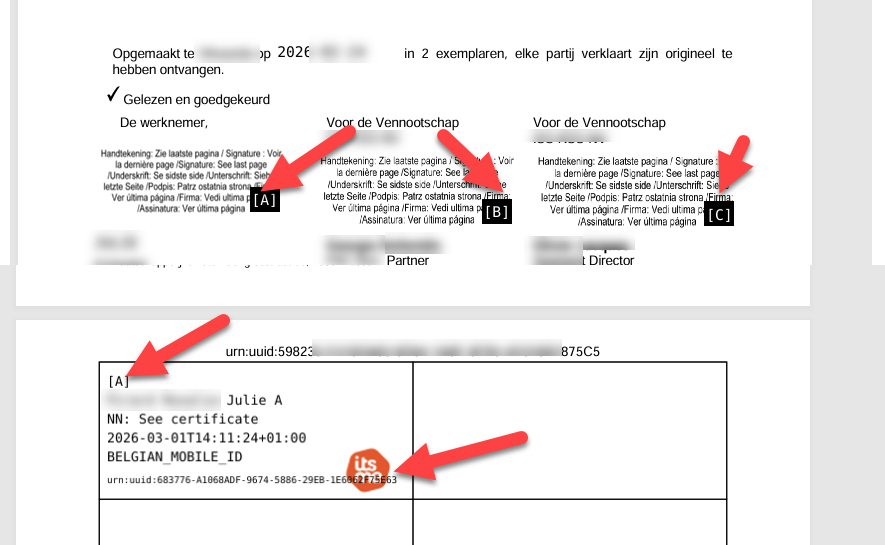
At the location where you placed the signature field(s) in the OKSign Editor (or via the API), a message appears indicating that the signature can be found on the last page of the signed document.
For each mention “signature see last page”, a reference (A, B, C, …) is added and repeated in the signature on the last page so you can easily see which signature corresponds to which position(s) in the document.
The logo of the signing method (EID logo or itsme® logo) is shown for each signature on the last page.
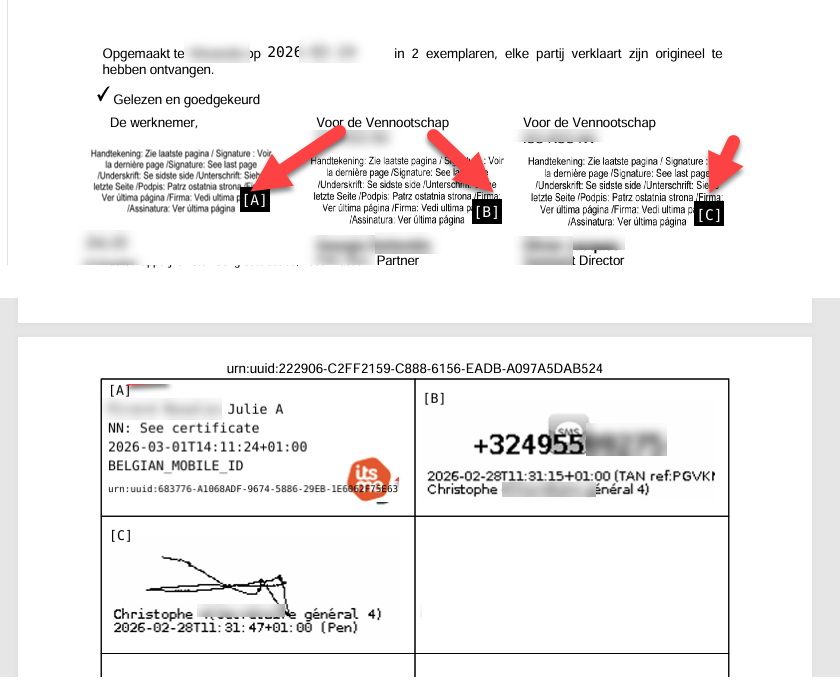
After the first X.509 signature, all subsequent signatures will always be placed on the last page, even if signed with “Pen” (touchscreen signature) or via TAN/SMS:
How to Check Who Signed a PDF Document Using the itsme® eSign Service?
In Acrobat Reader, you can consult the certificate details at any time (see screenshot below).
Proceed as follows:
- Open the signed OKSign document in A.Reader and click the signature on the last page
- A popup appears: click Signature Properties
- Click Show Signer's Certificate
- Click Details and then Subject to view the signer’s details (name, national registry number).
Also note that in screenshot 1, the top shows Signed and all signatures are valid and in screenshot 2 The document has not been modified since this signature was applied.
This indicates that the signature is legally valid and that the document has not been modified after signing.
The signature also includes an embedded timestamp, which provides a “fixed date” for the signature.

Conclusion
X.509 signatures integrated into a PDF document form the foundation of reliable digital signing. Because the X.509 certificate is embedded in the PDF file, it always travels with the document. Anyone opening the document with Adobe Acrobat Reader can verify at any time who signed the document and whether the content has remained unchanged.
When that signature is also a qualified electronic signature under the eIDAS regulation, you have a solution that is both technically and legally very strong. For organizations wishing to digitize their processes without compromising on certainty, trust and legal validity, X.509‑based qualified signatures in PDF are a logical and future‑proof choice.
Related articles: