itsme® eSign Service – Qualified Electronic Signatures (QES)
16 January 2026

As mentioned in a previous blog post, OKSign now uses the itsme® eSign service to securely sign documents.
The itsme® eSign service, provided by Belgian Mobile ID NV, enables users to apply a Qualified Electronic Signature (QES) to a PDF document. This is the highest legally recognised signature level under the European eIDAS regulation. A QES has the same legal value as a handwritten signature and is accepted throughout the European Union.
From 1 January 2026 onwards, all signatures made via the itsme® eSign service will automatically be qualified signatures, with enhanced legal and technical processing.
What does an itsme® eSign signature look like in a PDF?
Because the itsme® signature is a qualified X.509 signature, it is added on a separate page at the end of the document. At the location where you placed signature fields in the OKSign Editor (or via the API), a message appears indicating that the official signature can be found on the last page.
If additional signatures are added later — via itsme® eSign or any other signing method — they will also appear on this final page.
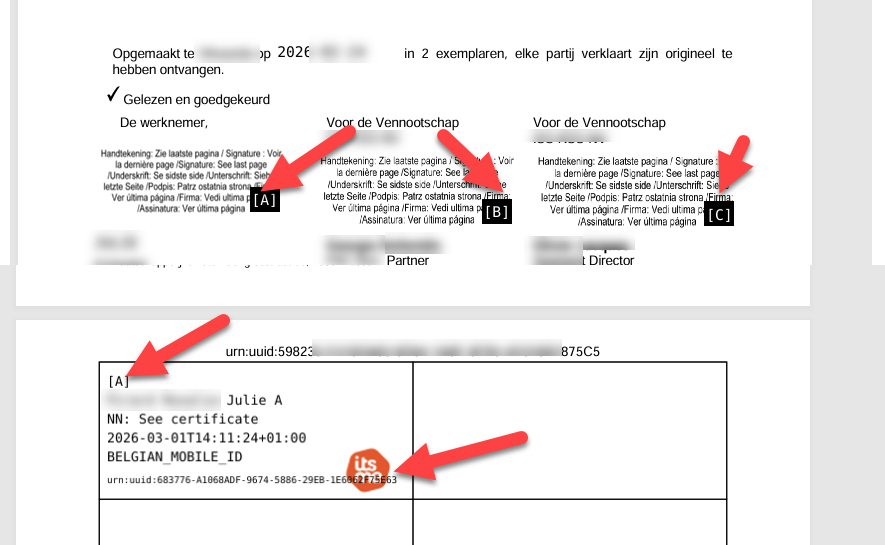
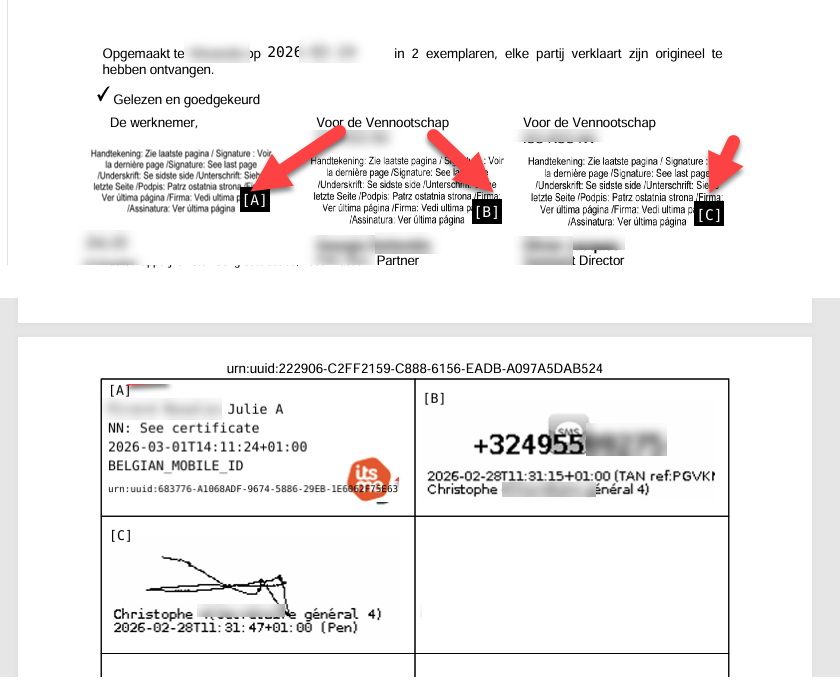
Each ‘signature see last page’ marker receives a reference (A, B, C, …). This reference is repeated next to the corresponding signature on the last page, making it easy to identify which signature belongs to which position in the document.
The logo of the signing method (eID or itsme®) is displayed next to each signature.
After the first X.509 signature, all subsequent signatures will always be placed on the last page — even if the signing is done with ‘Pen’ (touchscreen signature) or via TAN/SMS.
Impact for OKSign users
From 1 January onwards, every itsme® signature will automatically be a Qualified Electronic Signature. For OKSign users, nothing changes: you continue defining signature fields in the Editor (or via the API) exactly as before.
Impact for the signer
The signing experience remains unchanged. The familiar itsme® app workflow stays the same. Only once may the signer be asked to approve the creation of an X.509 certificate, which will then be used during the signing process.
The signing steps remain identical:
- Open the document via the link received by email or SMS
- Confirm personal details (email, name, capacity)
- Confirm that the document has been fully read
- Receive a notification in the itsme® app
- Confirm with the personal PIN code (possibly preceded by approval to create the X.509 certificate)
- Apply a Qualified Electronic Signature to the PDF document
How to verify who signed a PDF using the itsme® eSign service?
In Adobe Acrobat Reader, you can view the certificate details at any time.
Follow these steps:
- Open the signed OKSign document in Acrobat Reader and click the signature on the last page
- In the popup, click Signature Properties
- Click Show Signer's Certificate
- Click Details and then Subject to view the signer’s information (name, national registry number)
The first screenshot shows Signed and all signatures are valid, and the second shows The document has not been modified since this signature was applied. This confirms that the signature is legally valid and that the document has not been altered after signing.
The signature also includes an embedded timestamp, providing a legally reliable signing date.

API impact
The creditsinfo → subscription value will always be 0, as the cost of the itsme® eSign service is added to the credits parameter.
[
{
"signerid": "bt_00000000-0000-0000-0000-000000000001",
"signingoption": "itsme",
"credits": 4.2,
"subscription": 0
}
]
Questions?
Do you have questions or need advice on how to best use the itsme® eSign service within your organisation? Our team is ready to assist you (support@betrust.be).
Related articles:
- Activate itsme® : Your Secure Digital Identity at Your Fingertips
- Sign documents with the Smart-ID App and OK!Sign in Belgium
- Sign documents with the Smart-ID App and OK!Sign in Belgium
- >X.509 Signatures in PDF: Embedded Certificate Proves Who Signed
- >Timestamping a PDF: what is it, how does it work, and why is it legally so important?
- >Digital initials with OK!Sign: why they are unnecessary