Timestamping a PDF: what is it, how does it work, and why is it legally so important?
17 May 2026

A digital signature is legally strong, but with a timestamp, a document becomes legally airtight. A timestamp records the exact moment a document was signed and simultaneously fixes the content of the document at the moment of signing or certification.
With OKSign, all documents are always timestamped automatically, without any manual intervention.
What is a timestamp on a PDF document?
A timestamp is the digital equivalent of a “fixed date”. It is issued by a recognised TSA and embedded in the PDF document so that Acrobat Reader can always show the exact moment the signature was placed. In combination with an X.509 signature, the content of the document is also unambiguously fixed at the moment of signing.
What is a TSA (TimeStamp Authority)?
The timestamp does not come from the signer’s computer, but from a TSA (TimeStamp Authority).
A TSA is usually an independent commercial company, recognised by a government, that issues timestamps in accordance with the European eIDAS Regulation (2016). This is why a TSA timestamp is considered a legally valid “fixed date”, internationally recognised and suitable for use in legal proceedings to prove the moment of signing and the content of the document at that moment.
Why timestamp a PDF? (Main advantages)
1. Proof of when the signature was placed
An X.509 signature does contain a timestamp, but it is not legally reliable. A TSA timestamp is, because:
- the timestamp is independent
- it is cryptographically signed
- it cannot be manipulated
This allows you to objectively prove when a document was signed.
2. Proof of what content was signed
The timestamp is calculated based on the hash of the document. Any change — even a single comma — invalidates the timestamp.
This protects against:
- post‑signature contract changes
- fraudulent alterations
- manipulation of figures or conditions
3. Legal certainty: “fixed date” under eIDAS
A TSA timestamp counts as a fixed date, allowing you to prove:
- that the document existed at that moment
- that the content was exactly as it appears
- that the signature was placed on or before that moment
Essential for contracts, HR documents, offers, minutes, financial reports and compliance files.
4. Long‑Term Validation (LTV) of digital signatures
Certificates expire. Without a timestamp, a signature may become no longer verifiable after a few years.
With a TSA timestamp, the PDF becomes an LTV document (Long‑Term Validation):
- verifiable for many years
- suitable for archiving
- audit‑proof
How to check whether a PDF document contains a timestamp?
With the five steps below, you can check in Adobe Acrobat Reader whether a signed PDF contains a valid timestamp.
Step 1: Open the document and go to the Signature Panel
Open the document in Acrobat Reader and click Signature Panel in the blue bar.

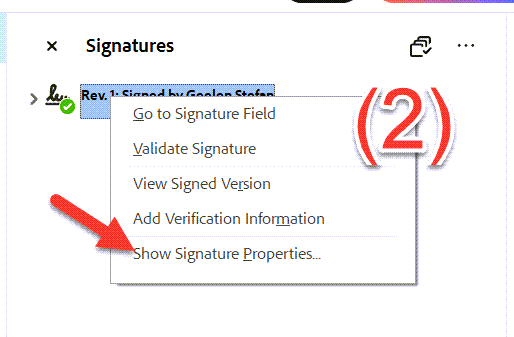
Step 2: Show the signature properties
Right‑click a signature and choose Show Signature Properties.
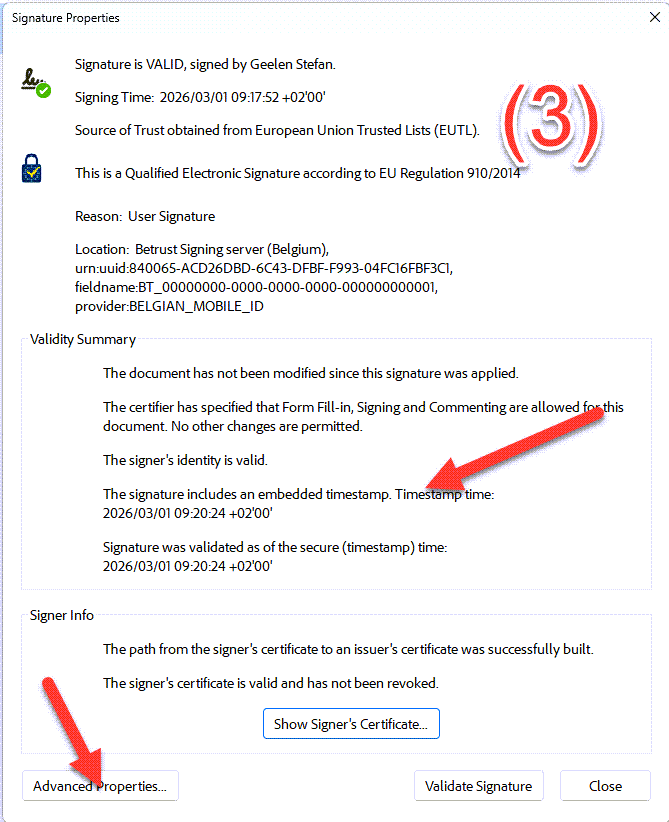
Step 3: Check whether the signature contains a timestamp
In the popup, under Validity Summary, you will see the message The signature includes an embedded timestamp, followed by the moment the signature was placed. Then click Advanced Properties.
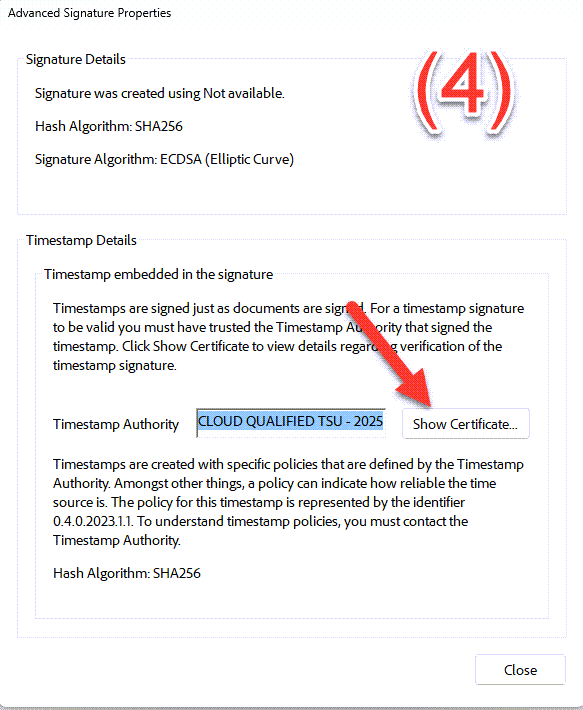
Step 4: View the Timestamp Details
Under Timestamp Details, you will see the name of the Timestamp Authority (TSA). Click Show Certificates to open the certificate.
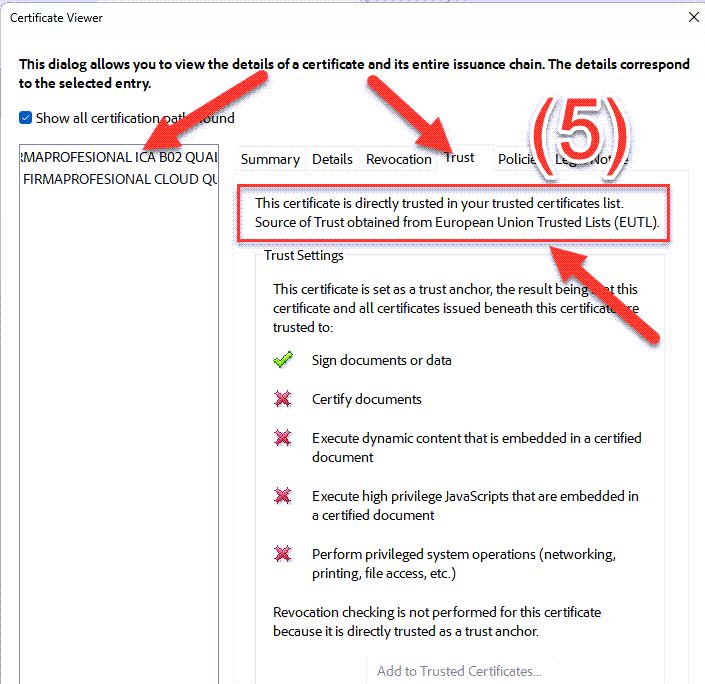
Step 5: Check whether the TSA is recognised
Select the root certificate (first in the list) and check whether the message Source of trust obtained from European Union Trusted Lists appears. This confirms that the timestamp comes from a recognised TSA and is therefore legally valid.
FAQ about timestamps and PDF documents
What is the difference between a digital signature and a timestamp?
A digital signature proves who signed. A timestamp proves when and what was signed.
Is a TSA timestamp legally valid?
Yes. Under eIDAS, a TSA timestamp counts as a fixed date and is legally valid throughout Europe.
Can a timestamp expire?
No. The timestamp remains valid even if certificates later expire, as long as the PDF is stored correctly.
Why is timestamping important for archiving?
Because the document remains verifiable even after many years, even if certificates or software no longer exist.
Conclusion
A timestamp is not a detail, but a legal foundation for digital documents. With a TSA timestamp, you have independent, cryptographic proof of:
- the exact moment of signing
- the complete, unaltered content of the document
It is essential for digital signatures, compliance, audits and long‑term preservation.
Related articles:
- itsme® eSign Service Explained – Qualified Electronic Signatures (QES)
- Activate itsme® : Your Secure Digital Identity at Your Fingertips
- Sign documents with the Smart-ID App and OK!Sign in Belgium
- Sign documents with the Smart-ID App and OK!Sign in Belgium
- >X.509 Signatures in PDF: Embedded Certificate Proves Who Signed
- >Digital initials with OK!Sign: why they are unnecessary